I remember the first time I used a smartphone. It wasn't just the sleek design or the vibrant display that captivated me; it was the sheer magic of interacting with it. With a gentle tap, a swipe, or a pinch, the device responded flawlessly, as if reading my mind. This wasn't a clunky button or a sticky trackball; it was fluid, intuitive, and seemingly effortless. But beneath that smooth glass surface, a complex dance of physics and electronics unfolds every single time our finger meets the screen.
Have you ever stopped to wonder, **how does a flat piece of glass actually *know* where your finger is?** It’s a question that many of us casually overlook, despite touchscreens being an indispensable part of our daily lives, from smartphones and tablets to ATMs and car dashboards. This isn't just about pressing a button; it's about a sophisticated sensing mechanism that has evolved dramatically over the past few decades. Let's peel back the layers and understand the ingenious technology that makes our digital world so interactive.
## The Invisible Grid: Unpacking Touchscreen Fundamentals
At its core, a touchscreen is an input device that allows a user to interact with a computer by touching areas on the screen with a finger or a stylus. But not all touchscreens are created equal. Historically, two primary technologies have dominated the market: **resistive** and **capacitive**. Understanding these two types is key to appreciating the subtle yet profound difference in how they "feel" and function.
### The Original Responder: Resistive Touchscreens
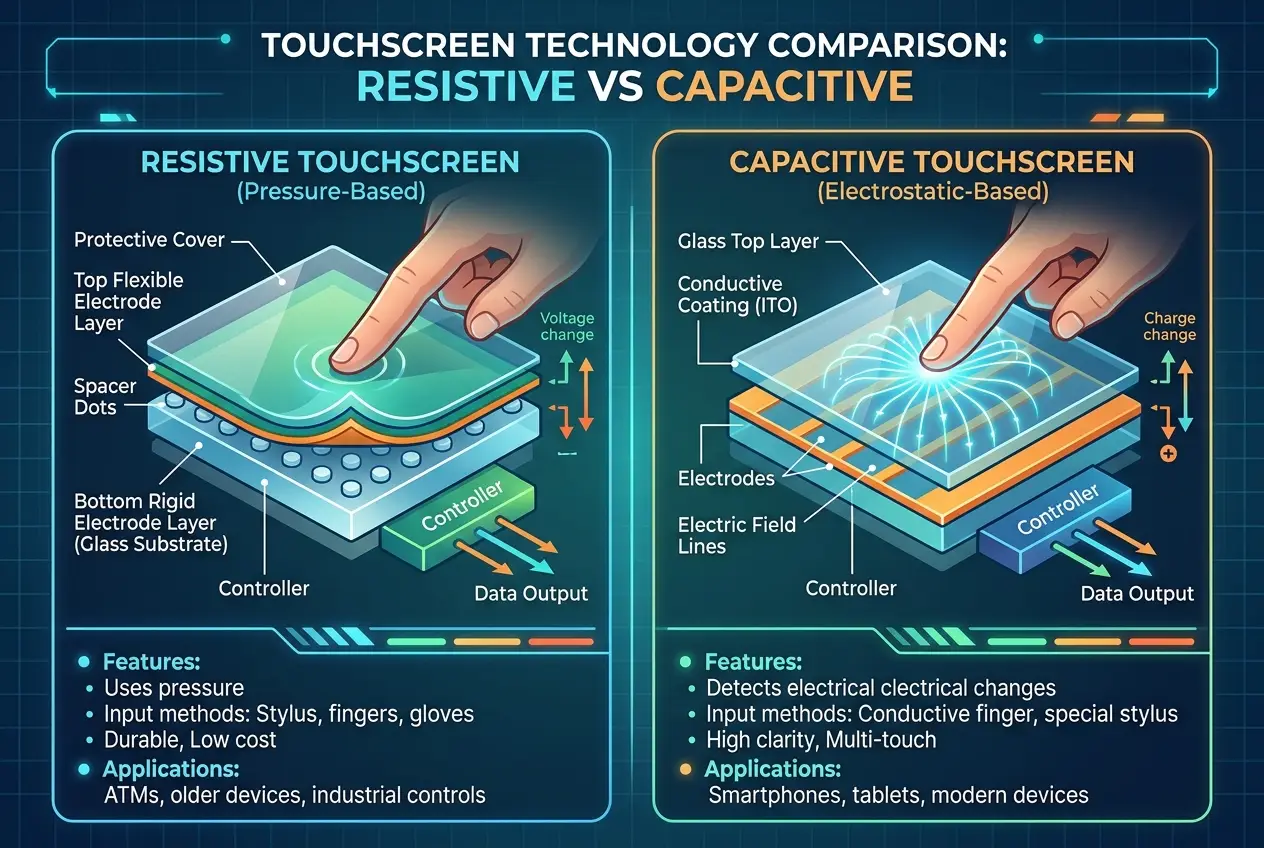
Imagine two transparent, electrically conductive layers, separated by a tiny gap. That’s the basic principle of a resistive touchscreen. When you press on the screen, your finger causes these two layers to come into contact at that specific point. This contact changes the electrical resistance at that location, which the device's controller then measures.
* **How it Works:** The top layer has a coating of indium tin oxide (ITO) on its bottom side, and the bottom layer has ITO on its top side. A voltage is applied across the layers. When pressure is applied, the layers touch, completing a circuit. The precise location of this contact point is calculated by measuring the voltage drop across the grid. You can find more detailed technical explanations of resistive touchscreens on [Wikipedia](https://en.wikipedia.org/wiki/Resistive_touchscreen).
* **Pros:** Resistive screens are cost-effective to produce and, crucially, they can be operated with almost any object – a bare finger, a gloved hand, a stylus, or even a pen. This versatility made them popular in environments where gloves are worn, like industrial settings, or for devices requiring precise input with a stylus, such as early PDAs and the Nintendo DS.
* **Cons:** The biggest drawback is their sensitivity and clarity. Requiring physical pressure means they are less responsive and durable, often feeling somewhat "mushy." The multiple layers also reduce light transmission, making the display appear dimmer. Furthermore, they typically only support single-touch input, making gestures like "pinch-to-zoom" impossible. You might recall older devices or public kiosks having this type of screen, where a firm press was required.
### The Modern Marvel: Capacitive Touchscreens
The ubiquitous technology in nearly every smartphone and tablet today is the **capacitive touchscreen**. This is where the real "magic" of responsive, multi-touch gestures truly comes alive. Unlike resistive screens that rely on pressure, capacitive screens detect the tiny electrical charge that your body naturally carries.
* **How it Works:** The screen's surface is coated with a transparent conductive material, often ITO, which holds a uniform electrostatic field. The human body is a conductor of electricity. When your finger touches the screen, it draws a minuscule amount of current from this field, causing a measurable change in the capacitance at that specific point. Sensors located at the corners or edges of the screen detect this change. By continuously monitoring the capacitance across the entire grid, the device's controller can precisely pinpoint the location of your finger. A comprehensive overview of capacitive sensing can be found on [Wikipedia](https://en.wikipedia.org/wiki/Capacitive_sensing).
* **Pros:** Capacitive screens are incredibly sensitive and responsive, registering even the lightest touch. Their single-layer construction allows for much brighter and clearer displays. Crucially, they enable **multi-touch gestures**, allowing you to use multiple fingers simultaneously for actions like zooming, rotating, and scrolling. This capability revolutionized how we interact with mobile devices. They are also much more durable, as there are no moving parts to wear out.
* **Cons:** The primary limitation is that they require a conductive input. This means bare fingers or specialized conductive styluses are necessary. Regular gloves or non-conductive objects simply won't work, which can be an inconvenience in cold weather or specific professional settings.
I've been fascinated by the sheer precision these screens offer. When I swipe through photos or play a game, it feels like an extension of my own thoughts, rather than a mere input device. This level of seamless interaction is largely due to the continuous advancements in capacitive technology.
## The Brain Behind the Fingers: Processing the Touch
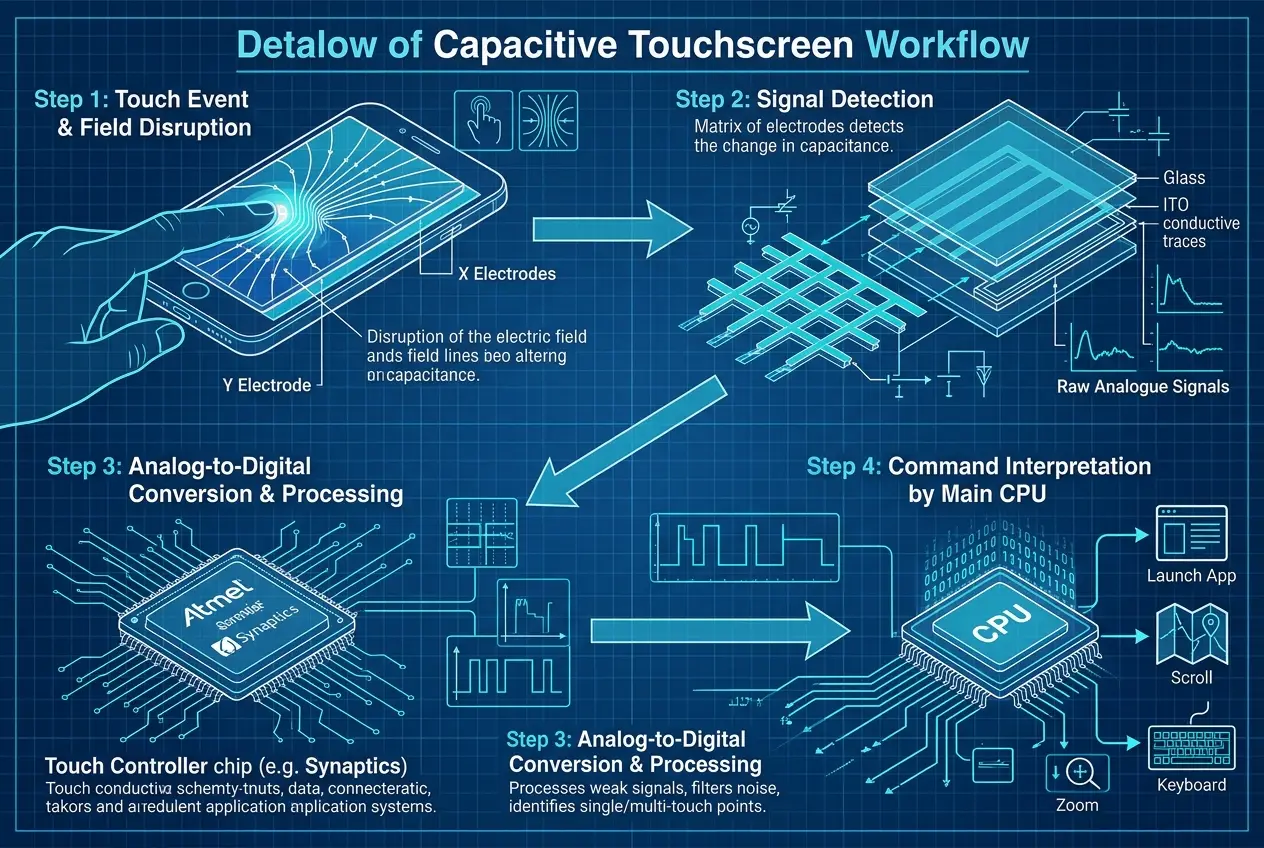
Detecting a touch is one thing; understanding it is another. Once the screen registers a change in capacitance, this raw data is sent to a **touch controller** (a small microchip). This controller is the true "brain" of the touchscreen system.
It performs several critical tasks:
1. **Signal Interpretation:** It converts the analog electrical signals from the screen's sensors into digital coordinates (X, Y).
2. **Noise Filtering:** It filters out electrical noise and interference to ensure accurate touch detection.
3. **Multi-Touch Tracking:** For capacitive screens, it employs sophisticated algorithms to track multiple simultaneous touch points, distinguishing between individual fingers, palms, or accidental touches. This is where the real complexity lies. Without robust algorithms, multi-touch would be a chaotic mess of overlapping signals.
4. **Reporting to the CPU:** Finally, it sends these processed coordinates and gesture information to the device's main CPU, which then translates them into actions within the operating system or application.
This entire process happens in milliseconds, giving us that instant, fluid response we've come to expect. The ability to recognize complex gestures, like the difference between a tap, a long press, a swipe, or a pinch, relies heavily on these sophisticated algorithms and the processing power of the touch controller and main CPU. It's a prime example of how hardware and software work in perfect harmony to create a truly intuitive user experience.
## Beyond the Tap: The Evolution of Touch Interaction
The journey of touch technology doesn't stop at simply detecting a finger. Innovation continues to push the boundaries of what's possible, leading to richer and more immersive interactions.
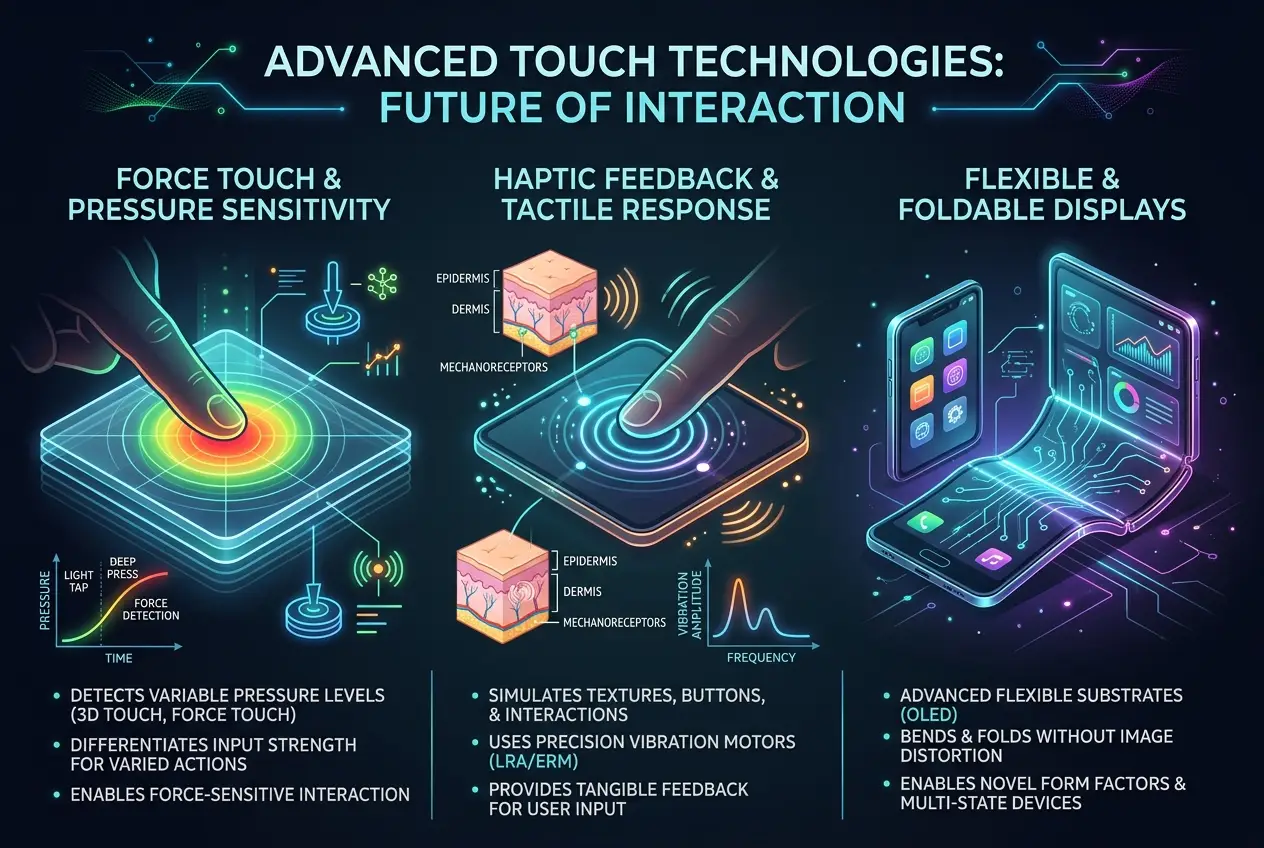
* **Force Touch/Haptic Feedback:** Some modern devices, like certain iPhones and Apple Watch models, incorporate force-sensing technology. This allows the device to distinguish between a light tap and a harder press, opening up new layers of interaction. Coupled with **haptic feedback**, where tiny motors create tactile sensations, touchscreens can "simulate" textures or the feeling of a physical click, even though it's all on a flat glass surface. This adds another dimension to the user experience, making interactions feel more tangible.
* **Proximity Sensing:** While not strictly "touch," many devices use proximity sensors to detect when your face is near the screen during a call, automatically turning off the display to prevent accidental touches and save battery. This works by emitting an infrared light and detecting its reflection.
* **Flexible and Foldable Displays:** The rise of flexible OLED technology has paved the way for bendable and foldable phones. These screens utilize advanced capacitive grids that can withstand bending and creasing without losing their ability to detect touch. This presents exciting possibilities for future device form factors and interactive experiences. If you're curious about how new materials are reshaping electronics, check out our post on [can-exotic-materials-reshape-electronics-7963](https://curiositydiaries.com/blogs/can-exotic-materials-reshape-electronics-7963).
* **Ultrasonic Touch:** Although not widespread in consumer devices, ultrasonic touch technology uses sound waves to detect touches. A transducer generates ultrasonic waves across the screen, and when a finger touches the surface, it absorbs or reflects some of these waves. Sensors then detect the changes, providing a highly accurate touch location. This technology can even work through gloves or water, making it suitable for specialized applications.
* **Future Horizons:** The future of touch promises even more incredible experiences. Researchers are exploring screens that can dynamically change their texture or shape, allowing users to "feel" digital objects. We might also see screens that detect gestures *above* the surface, allowing for touchless interaction, or even **micro-haptics** that provide feedback at the individual pixel level. The integration of advanced AI and new sensor materials, potentially even related to concepts like [can-liquid-metal-forge-our-robotic-future-5140](https://curiositydiaries.com/blogs/can-liquid-metal-forge-our-robotic-future-5140) for dynamic interfaces, hints at a future where our devices become even more responsive and intuitively connected to us.
From the rudimentary resistive pads of early devices to the sophisticated multi-touch capacitive displays that govern our daily interactions, the journey of touchscreens is a testament to relentless innovation. It’s a field where the invisible forces of electromagnetism and the subtle mechanics of human biology converge to create an interface that is both incredibly simple to use and remarkably complex in its engineering.
The next time you effortlessly scroll through your social media feed, pinch to zoom into a photo, or type a message with lightning speed, take a moment to appreciate the intricate dance of electrons and algorithms happening beneath your fingertips. It’s a silent, seamless marvel of modern technology, constantly evolving to make our digital world feel ever more natural and intuitive.
Frequently Asked Questions
Resistive touchscreens rely on physical pressure to bring two conductive layers into contact, making them work with any object but often less sensitive. Capacitive touchscreens detect the electrical disturbance caused by a conductive object (like a finger) on an electrostatic field, offering higher sensitivity, multi-touch, and clearer displays, but require conductive input.
Most smartphones use capacitive touchscreens, which require a conductive material to register a touch. Regular gloves are insulators and do not conduct electricity, so they prevent your finger's natural electrical charge from interacting with the screen's electrostatic field. Special conductive gloves or styluses are designed to overcome this.
Multi-touch is primarily enabled by advanced capacitive touchscreen technology combined with sophisticated algorithms in the device's touch controller. The screen can simultaneously detect and track multiple points of capacitance change, and the software interprets these multiple inputs as complex gestures like pinching, zooming, or rotating.
Yes, beyond the common resistive and capacitive types, innovations like ultrasonic touch (using sound waves), force touch (distinguishing pressure levels), and screens with advanced haptic feedback (simulating textures) are being explored or are already in specialized use. The future also holds promise for gesture detection above the screen and dynamic tactile surfaces.
The touch controller, a dedicated microchip, receives analog electrical signals from the screen's sensors. It then converts these into digital X-Y coordinates, filters out electrical noise, tracks multiple touch points using complex algorithms, and finally sends this processed, interpreted data to the device's main CPU for further action and command execution.
Verified Expert
Alex Rivers
A professional researcher since age twelve, I delve into mysteries and ignite curiosity by presenting an array of compelling possibilities. I will heighten your curiosity, but by the end, you will possess profound knowledge.
Leave a Reply
Comments (0)
No approved comments yet. Be the first to share your thoughts!
 Join Us



 Unknown Author































Leave a Reply
Comments (0)