I remember the first time I saw a truly next-generation video game. It wasn't just the expansive worlds or the intricate character models; it was the way light bounced off surfaces, the subtle reflections in puddles, the realistic sway of grass in the wind. It felt less like I was playing a game and more like I was peering into another reality, crafted with impossible detail. For years, I simply accepted this as "magic graphics" or "powerful computers." But as I delved deeper into the world of technology, I began to wonder: **what exactly is happening inside my gaming rig that allows these hyper-realistic digital worlds to spring to life on my screen?** How do these intricate virtual environments, bustling with dynamic elements and stunning visual fidelity, go from lines of code to breathtaking imagery?
It turns out, the "magic" isn't magic at all, but an incredibly complex ballet of mathematics, physics, and highly specialized hardware orchestrated by a component we often take for granted: the Graphics Processing Unit, or GPU.
### The Unsung Hero: What is a GPU?
At its core, a GPU is a specialized electronic circuit designed to rapidly manipulate and alter memory to accelerate the creation of images in a frame buffer intended for output to a display device. While your Central Processing Unit (CPU) is a jack-of-all-trades, excellent at sequential tasks and complex logic, a GPU is a master of one: **parallel processing**. Think of it this way: a CPU is a brilliant professor solving one complex problem at a time, whereas a GPU is a thousand students solving a thousand simpler problems simultaneously.
This parallel architecture is perfectly suited for the demands of computer graphics. Every pixel on your screen, every shadow, every reflection, every particle effect needs to be calculated, often independently, and then displayed in rapid succession to create the illusion of motion. A typical 1080p screen has over two million pixels. At 60 frames per second, a GPU needs to render **120 million pixels every second** – and that’s just for the base color! Add lighting, textures, and geometry, and the computational load becomes astronomical.
### From Virtual World to Visible Pixels: The Rendering Pipeline
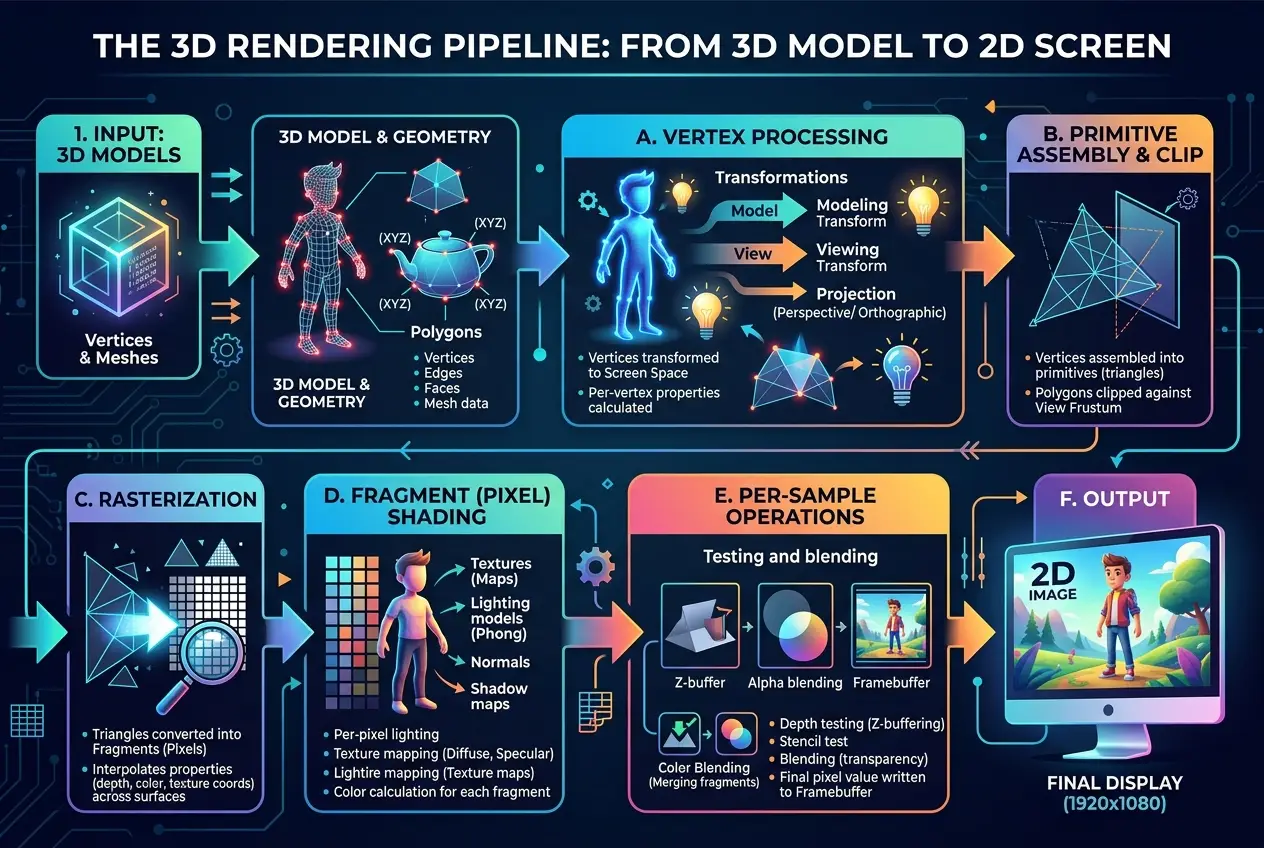
To understand how GPUs forge reality, we need to break down the rendering pipeline, a series of steps a GPU takes to transform a 3D model into a 2D image on your screen. It’s a fascinating journey that involves multiple stages, each meticulously calculated.
#### 1. Geometry and Vertex Shading: Building the Framework
The first step is about defining the objects in the 3D scene. Every character, tree, car, or building in a game is represented by a mesh of interconnected triangles, known as polygons. The corners of these triangles are called **vertices**. Each vertex has attributes: its position in 3D space (x, y, z coordinates), its color, its texture coordinates, and its normal vector (which indicates which way the surface is facing, crucial for lighting).
The **Vertex Shader** is the first programmable stage in the pipeline. Here, the GPU takes these raw vertex data and transforms them. It might apply translations, rotations, and scaling to move objects around the scene, or deform character models based on animation data. Most importantly, it projects these 3D coordinates into a 2D space, preparing them for display on your screen. This process is complex, often relying on advanced mathematical operations to ensure objects look correct from the player's perspective. For a deeper dive into this initial transformation, you can explore the concept of a graphics pipeline on Wikipedia: [https://en.wikipedia.org/wiki/Graphics_pipeline](https://en.wikipedia.org/wiki/Graphics_pipeline).
#### 2. Rasterization: From Vectors to Pixels
Once the GPU knows where the vertices of each triangle will appear on the 2D screen, the next step is **rasterization**. This is the process of converting vector graphics (lines and shapes) into raster graphics (a grid of pixels). The rasterizer effectively "fills in" the triangles, determining which pixels on your screen are covered by each polygon.
For every pixel that falls within a triangle, the rasterizer generates a **fragment**. A fragment is essentially a "potential pixel" – it contains information like its screen position, depth (how far it is from the camera), and interpolated values for color and texture coordinates derived from the triangle's vertices. This stage is computationally intensive, as millions of fragments might be generated for a single frame.
#### 3. Fragment (Pixel) Shading: Adding Detail and Light
Now that we have fragments, the GPU needs to decide their final appearance. This is where the **Fragment Shader** (often called the Pixel Shader) comes into play, and it’s arguably where much of the visual magic happens. The fragment shader is a small program executed for every single fragment. It calculates the final color of each pixel, taking into account a myriad of factors:
* **Textures:** Applying images (textures) onto surfaces to give them detail, like the bark of a tree or the pattern on a character's clothing.
* **Lighting:** Calculating how light sources (sun, lamps, explosions) interact with the surface. This involves complex physics models to simulate diffuse reflections (like a matte wall), specular reflections (like a glossy surface), and shadows.
* **Materials:** Determining how light interacts with different materials – is it metallic, rough, transparent, or reflective? Modern games use Physically Based Rendering (PBR) techniques to achieve incredibly realistic material properties.
* **Post-processing Effects:** After all individual pixels are colored, the entire image can be passed through additional shaders for effects like bloom, depth of field, motion blur, and anti-aliasing (to smooth jagged edges).
The fragment shader leverages a vast amount of data and performs millions of calculations per frame. It’s a testament to parallel processing, where each fragment is processed independently by a dedicated shader core on the GPU. Want to know more about textures and how they are used? See our previous post on [can-graphene-chips-unleash-ai-superpowers-8640](/blogs/can-graphene-chips-unleash-ai-superpowers-8640) which touches upon high-performance data handling.
#### 4. Output Merging: The Final Touch
The final stage involves combining all the processed fragments into the final image. This includes resolving overlapping objects (using depth buffering to ensure closer objects obscure farther ones), blending transparent objects, and applying anti-aliasing techniques. The finished image is then stored in the GPU’s **Video RAM (VRAM)**, ready to be sent to your monitor. This entire pipeline needs to execute dozens, sometimes hundreds, of times per second to provide a smooth, immersive experience.
### Beyond the Basics: Modern GPU Innovations
The rendering pipeline described above is a simplification, and modern GPUs incorporate a host of advanced techniques to push realism even further.
#### Ray Tracing: A Leap in Lighting
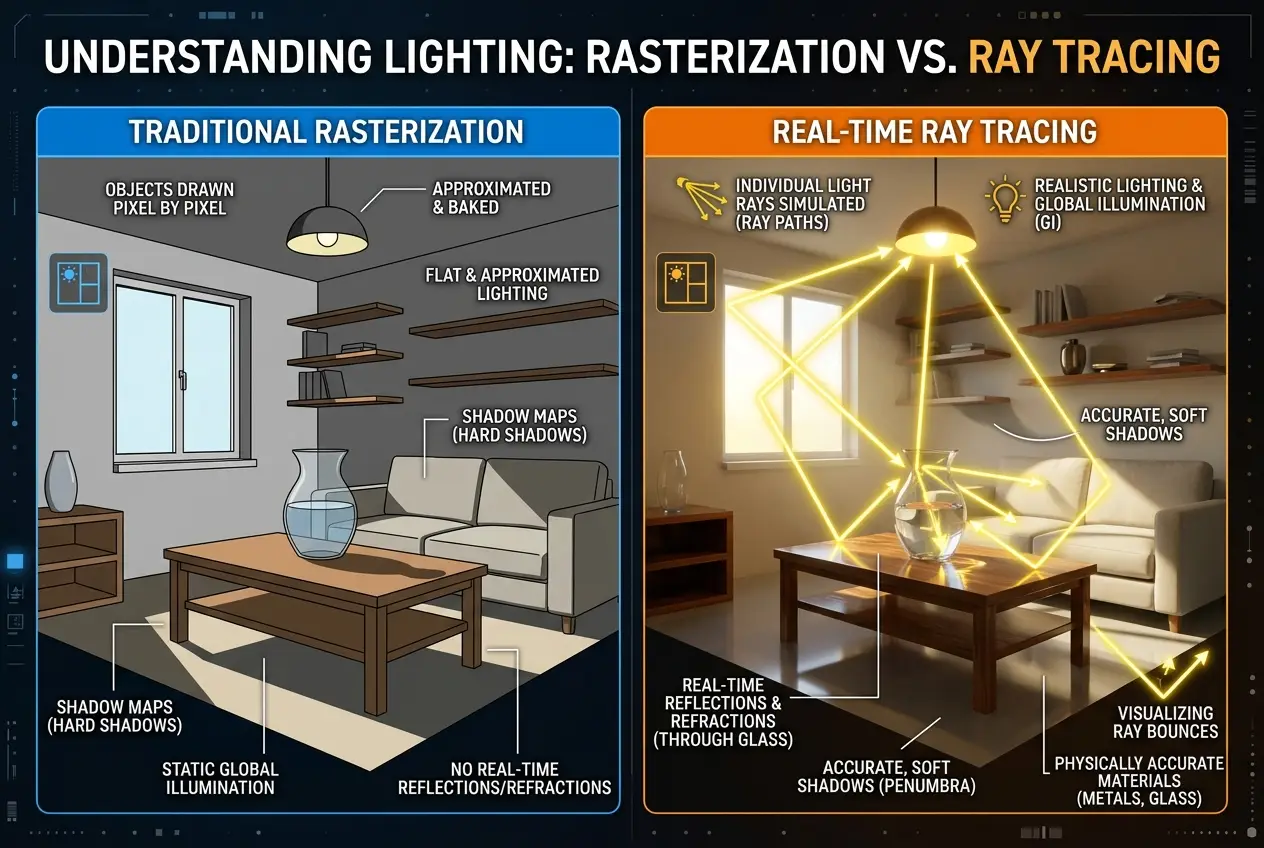
Traditional rendering, primarily based on rasterization, approximates how light behaves. **Ray tracing**, however, simulates light more accurately. Instead of projecting triangles, ray tracing simulates individual light rays bouncing off surfaces, calculating reflections, refractions, and shadows with incredible precision. Imagine a scene where light genuinely reflects off a shiny floor, creating a perfect mirror image of the room – that’s ray tracing at work. While computationally demanding, hardware-accelerated ray tracing (found in modern GPUs like NVIDIA's RTX series and AMD's RX series) is rapidly becoming a standard for next-generation graphics. Learn more about the principles of ray tracing on its Wikipedia page: [https://en.wikipedia.org/wiki/Ray_tracing_(graphics)](https://en.wikipedia.org/wiki/Ray_tracing_(graphics)).
#### AI Upscaling: DLSS and FSR
One of the most remarkable recent innovations leverages Artificial Intelligence. Technologies like NVIDIA’s Deep Learning Super Sampling (DLSS) and AMD’s FidelityFX Super Resolution (FSR) use AI to render games at a lower internal resolution and then intelligently upscale them to a higher resolution, often with better quality than native rendering. This significantly boosts performance without sacrificing visual fidelity. Your GPU's dedicated AI cores (Tensor Cores in NVIDIA GPUs) are essential for these operations, demonstrating how AI is becoming integral to graphics rendering. This use of AI for performance optimization is a cutting-edge example of how powerful computing can be. Discover more about raw computing speed and light in our blog: [is-light-our-universes-fastest-computer-3214](/blogs/is-light-our-universes-fastest-computer-3214).
### The Role of VRAM: GPU’s Workspace
Just as your CPU needs RAM, your GPU needs its own high-speed memory, called **Video RAM (VRAM)**. VRAM stores all the data the GPU needs to render a frame: textures, frame buffers, depth buffers, and more. The higher the resolution you play at, and the more detailed the textures and models are, the more VRAM your GPU will require. Running out of VRAM can lead to performance drops and stuttering as the GPU has to constantly swap data from slower system RAM. For a comprehensive overview of VRAM, refer to its Wikipedia entry: [https://en.wikipedia.org/wiki/VRAM](https://en.wikipedia.org/wiki/VRAM).
### Why Dedicated GPUs are Essential for Gaming
While integrated graphics (found within your CPU) can handle basic tasks and light gaming, a dedicated GPU is crucial for serious gaming and demanding graphical workloads. The sheer number of processing units (shader cores), the specialized memory (VRAM), and the optimized architecture for parallel computation make dedicated GPUs orders of magnitude more powerful for rendering. They are specifically engineered to handle the massive data throughput and complex calculations required to create those breathtaking virtual worlds.
### Conclusion: The Art and Science of Digital Reality
The journey from a simple 3D model to the vibrant, interactive world on your screen is a testament to human ingenuity and the relentless pursuit of technological advancement. Gaming GPUs are not just powerful chips; they are sophisticated engines that blend advanced mathematics, physics simulation, and innovative AI to literally forge digital reality, pixel by pixel, frame by frame.
The next time you dive into a hyper-realistic game, take a moment to appreciate the silent, tireless work of your GPU. It’s working miracles hundreds of times a second, painting new realities with light and shadow, allowing you to step beyond your own world and explore the limitless possibilities of digital creation. The constant evolution of GPU technology promises even more immersive and stunning experiences, blurring the lines between the real and the rendered. What future realities will these incredible machines unlock next?
Frequently Asked Questions
CPUs (Central Processing Units) are general-purpose processors designed for sequential tasks and complex logic, while GPUs (Graphics Processing Units) are specialized for parallel processing, handling many simpler calculations simultaneously, making them ideal for graphics rendering.
VRAM (Video RAM) is high-speed memory dedicated to the GPU, storing all data needed for rendering like textures and frame buffers. It's crucial for gaming because higher resolutions and detailed graphics require more VRAM to prevent performance bottlenecks and stuttering.
Ray tracing is an advanced rendering technique that simulates the physical behavior of light rays, calculating reflections, refractions, and shadows with extreme accuracy. This leads to significantly more realistic lighting, shadows, and material interactions compared to traditional rasterization.
AI upscaling technologies (like DLSS and FSR) render games at a lower resolution and then use artificial intelligence to intelligently reconstruct and enhance the image to a higher resolution. This significantly improves performance while often maintaining or even improving visual quality by leveraging AI algorithms.
The rendering pipeline is a sequence of steps a GPU follows to convert 3D geometric data from a game or application into a 2D image displayed on your screen. It includes stages like transforming objects, converting shapes into pixels (rasterization), applying textures and lighting (shading), and combining the final image.
Verified Expert
Alex Rivers
A professional researcher since age twelve, I delve into mysteries and ignite curiosity by presenting an array of compelling possibilities. I will heighten your curiosity, but by the end, you will possess profound knowledge.
Leave a Reply
Comments (0)
No approved comments yet. Be the first to share your thoughts!
 Join Us


 Unknown Author























Leave a Reply
Comments (0)