The instant gratification of modern computing is something I often take for granted. Remember the days of waiting minutes for your computer to boot up, or staring at a loading screen while a game sluggishly launched? Today, our devices spring to life in seconds, applications open almost instantly, and large files transfer at breathtaking speeds. This dramatic shift isn’t just about faster processors or more RAM; a silent revolution in data storage technology, the **Solid-State Drive (SSD)**, is truly the unsung hero behind this daily digital magic.
But how do these sleek, silent powerhouses store your entire digital life—from operating systems to vacation photos—with such incredible speed and reliability? And does "erasing" data on an SSD truly wipe it clean, or is there more to the story? I’m going to unpack the fascinating truth behind flash storage and reveal why your computer feels so responsive.
## The Mechanical Past: Spinning Plates and Slow Access
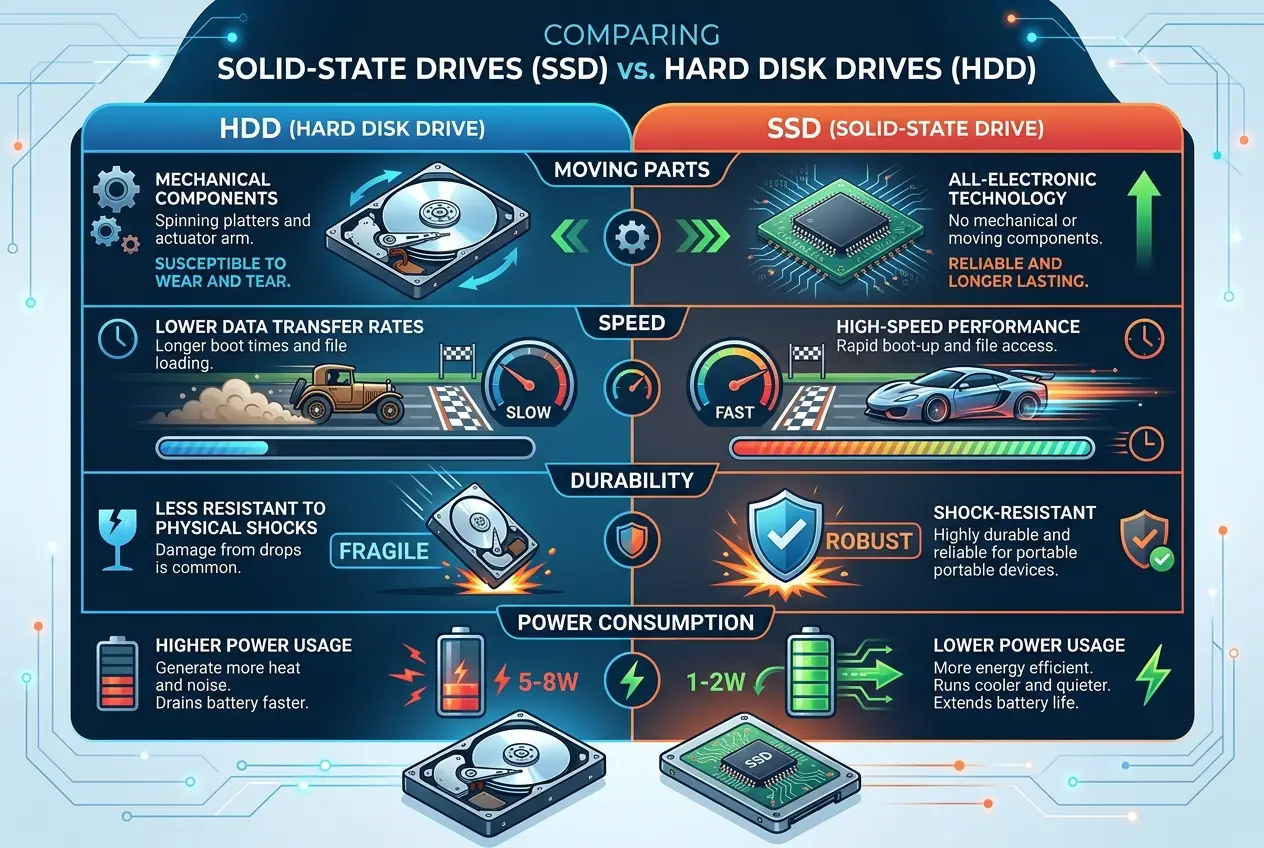
To truly appreciate the SSD, we must first glance back at its predecessor: the Hard Disk Drive (HDD). HDDs rely on **spinning platters** (like miniature record players) and read/write heads that physically move across these platters to locate and store data. It's a marvel of mechanical engineering, but inherently limited by the laws of physics—moving parts are slow, susceptible to damage, and generate heat and noise. Every click and whir was the sound of your computer working hard to find a file.
## The Digital Leap: What Makes an SSD Tick?
An SSD, by contrast, has no moving parts. Instead, it uses **NAND flash memory** to store data electronically. Think of it not as a rotating disc, but as a vast grid of tiny electrical gates that can be individually switched on or off to represent the 1s and 0s of binary code. This fundamental difference is why SSDs are orders of magnitude faster and more robust than HDDs.
### The Heart of the Matter: NAND Flash Memory
At the core of every SSD lies the NAND flash memory cell. I find the simplicity and genius of these cells truly remarkable. Each cell is essentially a transistor with an extra "floating gate" sandwiched between two insulating layers. This floating gate is where the electrons, representing your data, get trapped.
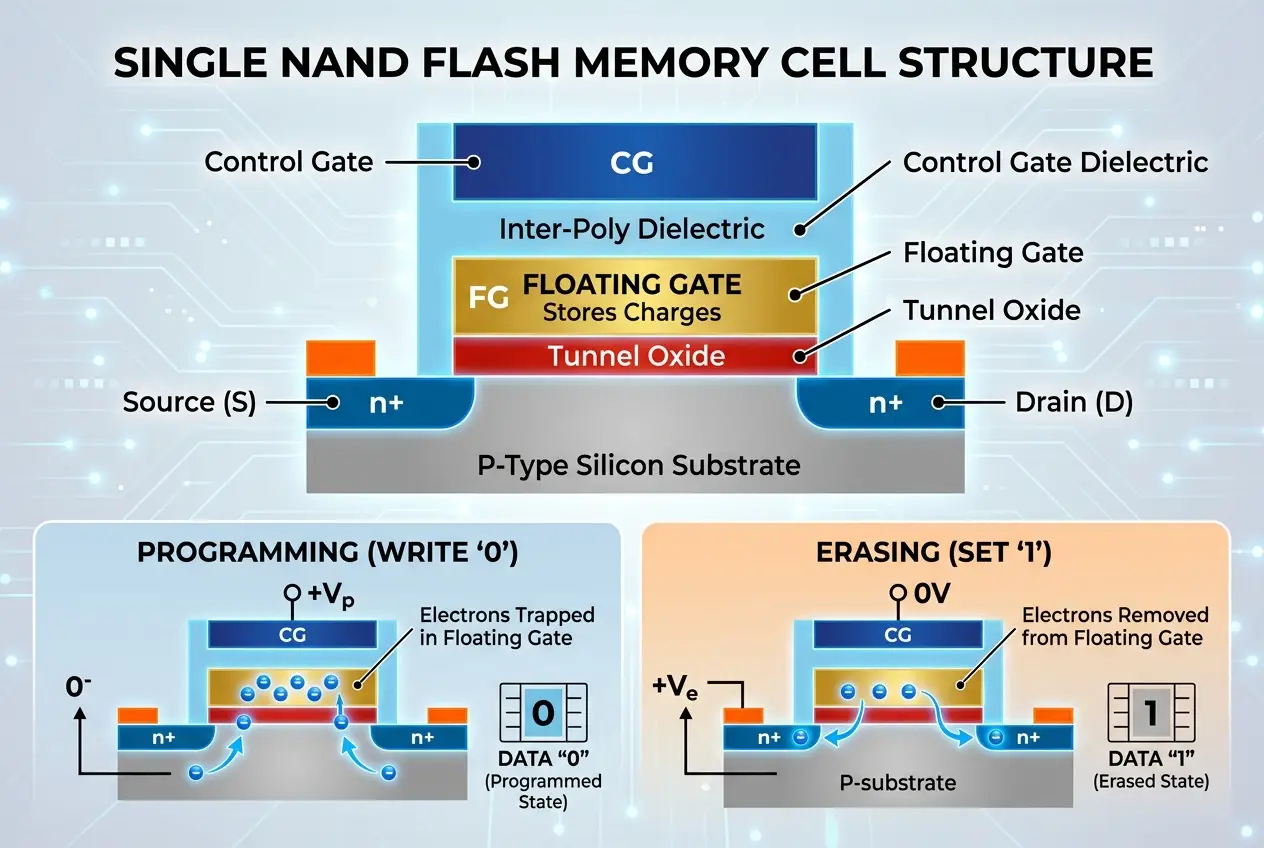
When data is "written" (programmed) to an SSD, a voltage is applied to the **control gate**, strong enough to push electrons through the insulating layer into the floating gate. Once trapped, these electrons remain there even when the power is off, making NAND flash **non-volatile memory**. This is why your computer doesn't lose its data when you shut it down.
To "read" the data, a smaller voltage is applied to the control gate. The presence or absence of electrons in the floating gate changes the electrical resistance of the cell, allowing the SSD controller to determine if it holds a 1 or a 0. This entire process happens at nearly the speed of light, explaining why your applications launch without delay. For more technical details on this fascinating process, you can explore the [NAND flash Wikipedia page](https://en.wikipedia.org/wiki/NAND_flash).
## How Data is Organized and Managed
While a single cell holds one or more bits of data, SSDs don't store or erase data one bit at a time. Data is organized into larger units:
* **Pages:** The smallest unit that can be programmed (written to). Typically 4KB to 16KB.
* **Blocks:** The smallest unit that can be erased. A block is composed of many pages, often 256 to 1024 pages (or 1MB to 4MB).
This block-based erasure is a critical detail. Unlike HDDs where you can overwrite individual bytes, an SSD *must* erase an entire block before it can write new data to any of its pages. This introduces a unique challenge: if you only want to change a few bytes on a page, the SSD has to read the entire block, modify the desired page in its cache, erase the old block, and then write the modified block back to a new location. This complex process is largely invisible to the user, thanks to the **SSD controller**.
## The SSD Controller: The Unseen Maestro
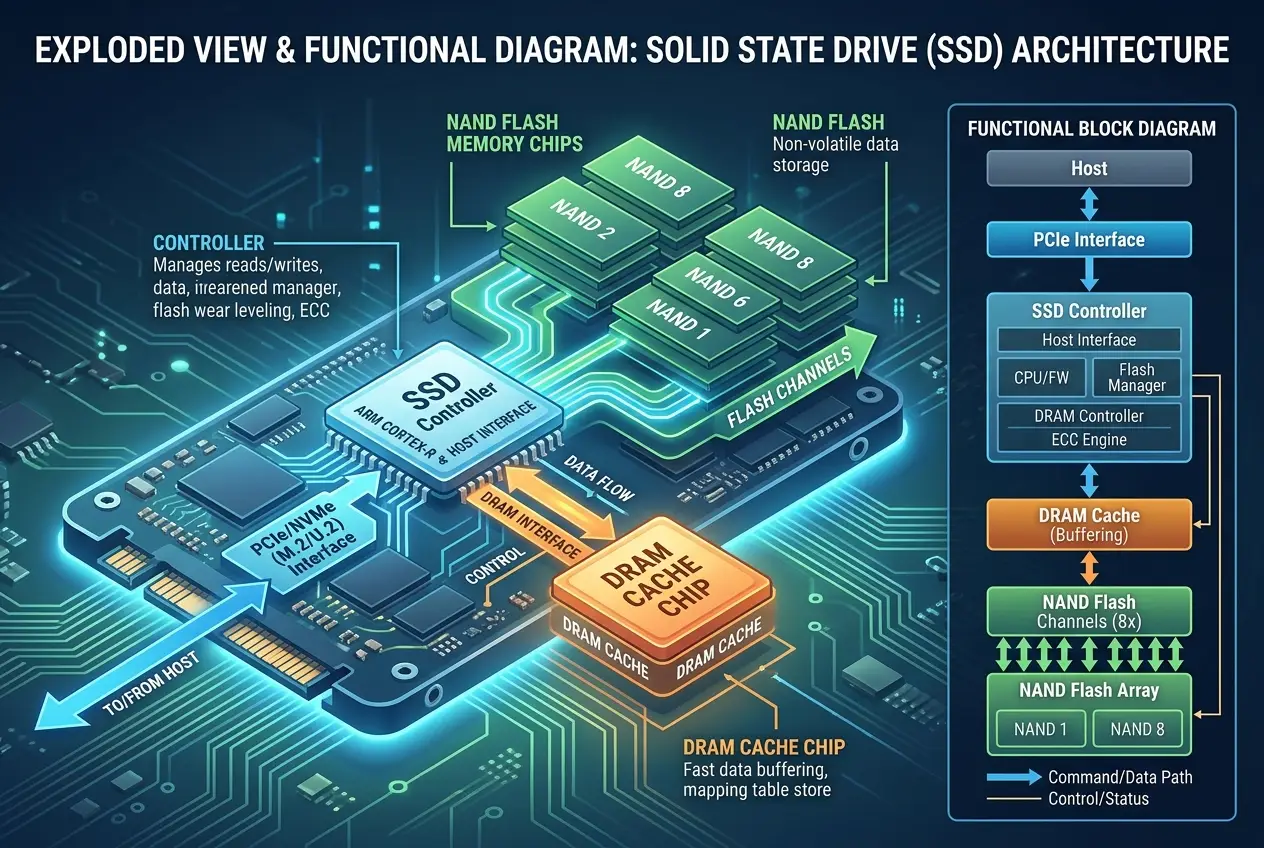
The SSD controller is arguably the most crucial component of the entire drive. It's a powerful processor that acts as the traffic cop, managing all data flow, error correction, and ensuring the drive performs optimally over time. Without it, your SSD would quickly degrade.
Key functions of the SSD controller:
1. **Wear Leveling:** Each NAND flash cell has a finite number of program/erase (P/E) cycles before it wears out. If data were always written to the same blocks, those blocks would fail much faster than others. The controller employs sophisticated **wear-leveling algorithms** to evenly distribute write operations across all NAND blocks, extending the lifespan of the entire drive. This prevents any single cell from being overused.
2. **Garbage Collection:** When you "delete" a file on your operating system, it simply marks the data as invalid. The SSD controller's garbage collection process then identifies these invalid pages within blocks, moves any *valid* data from partially filled blocks to new blocks, and then erases the old blocks to make them ready for new data. This happens in the background to ensure available clean blocks for future writes.
3. **Error Correction Code (ECC):** Flash memory is prone to minor errors. The controller uses ECC to detect and correct these errors, ensuring data integrity.
4. **Bad Block Management:** The controller identifies and isolates faulty blocks as they develop, preventing data from being written to them.
5. **Read and Write Caching:** Similar to how your computer's RAM works, SSDs often include a small amount of DRAM (dynamic random-access memory) to temporarily cache data, further boosting performance.
This intricate dance of data management is what makes an SSD fast and reliable. You can read more about how these controllers operate on [Wikipedia's SSD page](https://en.wikipedia.org/wiki/Solid-state_drive).
## Why SSDs are So Fast: Real-World Impact
The absence of moving parts, combined with parallel access to multiple NAND flash chips (the controller can read/write to many chips simultaneously), allows SSDs to achieve incredible speeds.
* **Near-Instant Boot Times:** This is why your laptop with an SSD can go from powered off to fully functional in less than 15 seconds, a stark contrast to the minute-plus boot times of older HDDs.
* **Rapid Application Launches:** Opening Photoshop, a large game, or a complex spreadsheet feels almost instantaneous because the SSD can retrieve all necessary files far quicker than an HDD ever could.
* **Blazing File Transfers:** Copying gigabytes of data between folders on the same SSD, or to another fast SSD, is astonishingly fast. This is why when you're working on large video projects or managing extensive photo libraries, an SSD dramatically improves your workflow.
* **Improved System Responsiveness:** Even simple tasks like browsing the web or opening multiple tabs feel smoother because the operating system itself can access its files and temporary data with minimal latency. This real-world boost is something I consistently appreciate daily.
* **Enhanced Battery Life:** Without spinning platters, SSDs consume less power, meaning your laptop can last longer on a single charge.
This is also why, when you consider upgrading your computer, switching from an HDD to an SSD is often the single most impactful upgrade you can make for overall system speed. It’s like giving your computer a new brain!
## The "Instant Erase" Myth and Data Recovery
Now, to address the title's question: **Does your SSD erase data instantly?** The truth is more nuanced. When you "delete" a file or format an SSD, the operating system primarily tells the SSD controller that those blocks of data are now available for reuse. It doesn't instantly zero-out every bit of data. Instead, it relies on processes like garbage collection and **TRIM commands** (which explicitly tell the SSD which blocks are no longer in use) to eventually erase the data in the background during idle times.
For average users, this means that simple deletion *does* make the data inaccessible by normal means and it *will* eventually be overwritten. However, for sensitive data, specialized secure erase functions or encryption are recommended. Just like how ancient scribes might have reused parchment by scraping off old text, the "erasure" process on an SSD is more about preparing blocks for new inscriptions than immediate, complete destruction. If you're curious about how digital memory persists, our article on [Do Our Electronics Hold Secret Dark Data?](blogs/do-our-electronics-hold-secret-dark-data-3980) offers some interesting insights into data remnants.
## The Future of Flash: Pushing the Limits
The evolution of SSDs isn't stopping. Manufacturers are constantly pushing boundaries:
* **3D NAND:** Stacking flash cells vertically allows for much higher storage density in the same physical space, leading to larger capacity drives.
* **QLC and PLC NAND:** These technologies store more bits per cell (Quad-Level Cell stores 4 bits, Penta-Level Cell stores 5 bits) further increasing capacity and reducing cost, though often at the expense of endurance and raw speed compared to SLC (Single-Level Cell) or MLC (Multi-Level Cell) NAND.
* **NVMe (Non-Volatile Memory Express):** A communication protocol specifically designed for SSDs that bypasses older bottlenecks like SATA, allowing SSDs to communicate directly with the CPU via PCIe lanes, unleashing even greater speeds.
As we continue to demand more from our devices, flash memory will remain a cornerstone of modern computing. The innovative ways we store information are always evolving, from discussing concepts like storing massive amounts of data in tiny spaces as explored in [Can a Single Atom Store All Our Data?](blogs/can-a-single-atom-store-all-our-data-2754) to exploring how [Exotic Materials Reshape Electronics](blogs/can-exotic-materials-reshape-electronics-7963), the quest for denser, faster storage is relentless.
## Conclusion
The SSD is far more than just a faster hard drive; it's a sophisticated piece of engineering that leverages the principles of quantum mechanics (electron trapping in floating gates) and advanced algorithms (wear leveling, garbage collection) to redefine our daily computing experience. The instant responsiveness we’ve come to expect from our phones, tablets, and laptops is a direct testament to the silent, tireless work of these flash memory powerhouses. So next time your computer boots in a blink, take a moment to appreciate the complex "digital magic" happening beneath the surface, ensuring your digital life is stored, accessed, and managed with unparalleled efficiency.
Frequently Asked Questions
The key difference is mechanical vs. electronic storage. HDDs use spinning platters and moving read/write heads, making them slower and more fragile. SSDs use NAND flash memory with no moving parts, storing data electronically for much faster access and greater durability.
SSDs do have a finite lifespan due to the limited number of program/erase (P/E) cycles each NAND flash cell can endure. However, modern SSDs use sophisticated wear-leveling algorithms managed by the controller to distribute writes evenly, ensuring they last for many years of typical use, often outliving the device they are in.
Wear leveling is a technique used by the SSD controller to distribute data writes evenly across all NAND flash memory blocks. This prevents specific blocks from being overused and wearing out prematurely, thereby extending the overall lifespan and endurance of the SSD.
Yes, it can be possible, especially if the deletion was recent and the data hasn't been overwritten. While the operating system marks the data as deleted, the SSD controller's garbage collection and TRIM commands might not have fully erased the physical blocks yet. For sensitive data, secure erase functions or encryption are recommended for true data privacy.
SSDs are generally more expensive per gigabyte due to the complex manufacturing processes for NAND flash memory chips and the advanced technology within the SSD controller. However, prices have been steadily decreasing, making them more accessible, and their performance benefits often outweigh the cost difference for many users.
Verified Expert
Alex Rivers
A professional researcher since age twelve, I delve into mysteries and ignite curiosity by presenting an array of compelling possibilities. I will heighten your curiosity, but by the end, you will possess profound knowledge.
Leave a Reply
Comments (0)
No approved comments yet. Be the first to share your thoughts!
 Join Us




 Unknown Author


































Leave a Reply
Comments (0)