Have you ever stopped to wonder what magic happens inside your smartphone when you tap the shutter button? One moment, you’re looking at a stunning sunset, and the next, a perfect digital replica is saved in your gallery. It’s an almost instantaneous process that we take for granted, but the journey from light entering a tiny lens to a crisp, shareable image is a marvel of modern engineering and computational power. I find it absolutely fascinating how these miniature devices have become indispensable tools for documenting our lives, often outperforming professional cameras of just a decade ago in certain situations.
### The Tiny Eye: More Than Just a Lens
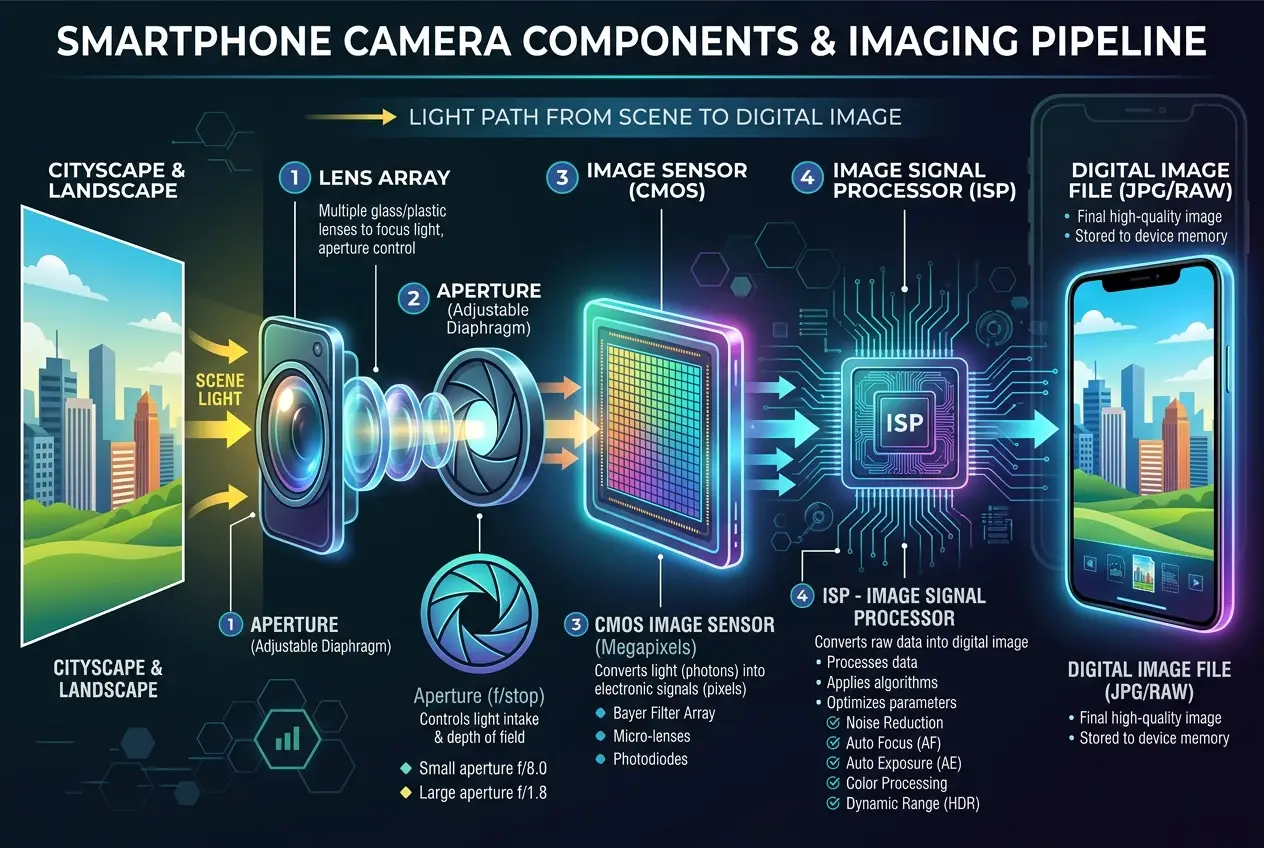
At the heart of every smartphone camera is, of course, the **lens**. But unlike the large, complex lenses on DSLRs, phone camera lenses are incredibly compact, made up of several small, precisely stacked plastic or glass elements. Their primary job is to gather light from the scene in front of you and focus it onto the image sensor. This might sound simple, but getting sharp focus and minimizing distortion from such a small aperture is a significant optical challenge.
Think about it: when you zoom in digitally, you're not physically moving lens elements. Instead, the camera uses a technique called **digital zoom**, which essentially crops and enlarges a portion of the image. This is why optical zoom on dedicated cameras yields much better results—it manipulates light *before* it hits the sensor, preserving detail. This is also why photos taken with a phone's digital zoom often look pixelated or less sharp compared to a wide-angle shot, a common frustration I’ve personally experienced when trying to capture distant details.
### Capturing Light: The Image Sensor's Secret
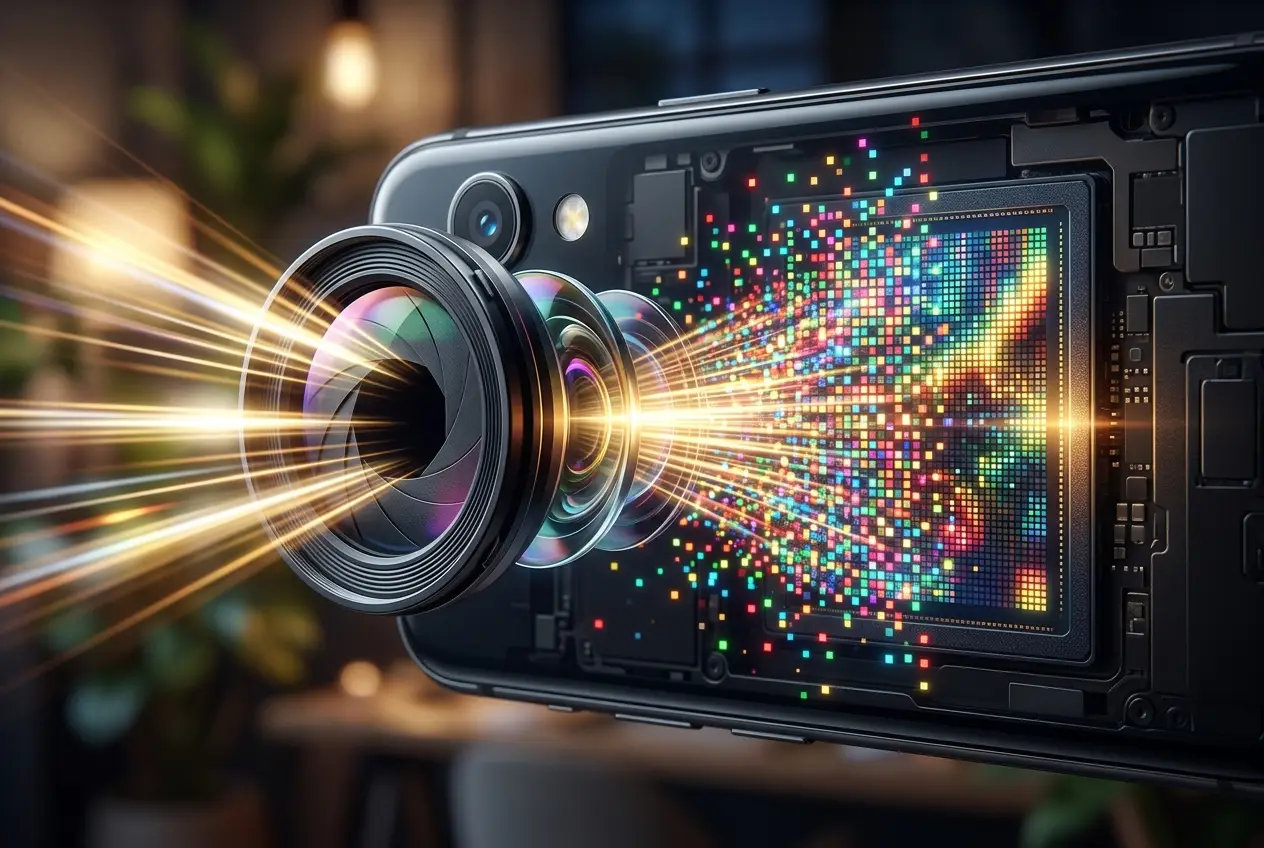
Once light passes through the lens, it hits the **image sensor**, the true "retina" of your phone camera. The vast majority of modern smartphone cameras use a **CMOS (Complementary Metal-Oxide-Semiconductor)** sensor. This is where photons – tiny particles of light – are converted into electrical signals.
Imagine the sensor as a grid of millions of tiny buckets, each corresponding to a single pixel in your final image. When light hits these buckets, they collect photons. The more light, the fuller the bucket, and the stronger the electrical signal generated. However, these "buckets" don't inherently see color. Each pixel on the sensor typically has a tiny color filter—red, green, or blue—placed over it. This arrangement, known as a Bayer filter array, means each pixel only records the intensity of *one* color.
This partial information is then painstakingly reconstructed. As explained on Wikipedia, a CMOS sensor converts light into an electrical charge, which is then digitized. This process forms the raw data that will eventually become your photograph. Without this intricate conversion, your phone would just be staring blankly at the world.
### The Brain Behind the Beauty: The Image Signal Processor (ISP)
The raw data from the image sensor is far from a beautiful photograph. It's essentially a grayscale mosaic of light intensities, with only one color value per pixel. This is where the **Image Signal Processor (ISP)**, often a dedicated chip or a component within your phone’s main processor, springs into action. The ISP is the unsung hero of your phone camera, performing a dizzying array of computations in milliseconds.
Here's a glimpse of what the ISP does:
1. **Demosaicing:** This is the critical step where the ISP intelligently interpolates the missing color information for each pixel. Since each pixel only recorded one color (R, G, or B), the ISP uses algorithms to "guess" what the other two color values should be, based on the colors of surrounding pixels.
2. **Noise Reduction:** Low-light conditions mean fewer photons, leading to "noisy" images – grainy speckles that detract from clarity. The ISP applies sophisticated algorithms to reduce this noise without blurring important details. This is why your phone struggles in dimly lit restaurants; there simply isn't enough light for the sensor to gather sufficient data without introducing noise. Our exploration into how digital glitches can hint at hidden realities, as discussed in [Digital Anomalies: Can Computers Show Unexplained Behaviors?](/blogs/digital-anomalies-glimpses-of-a-hidden-reality-1620), underscores how imperfections in data can be interpreted.
3. **White Balance:** Ensuring that white objects appear white in varying lighting conditions (e.g., warm indoor light vs. cool outdoor light).
4. **Color Correction:** Adjusting colors to appear natural and vibrant, often based on specific scene detection.
5. **Sharpening:** Enhancing edge details to make the image appear crisper.
6. **Lens Distortion Correction:** Compensating for any optical imperfections introduced by the small lens.
"The art of digital photography begins not when light hits the sensor, but when the processor interprets that light," says an expert in computational imaging. Without the powerful algorithms of the ISP, the raw sensor data would be unwatchable. You can read more about the intricate role of an ISP on its Wikipedia page.
### The Rise of Computational Photography
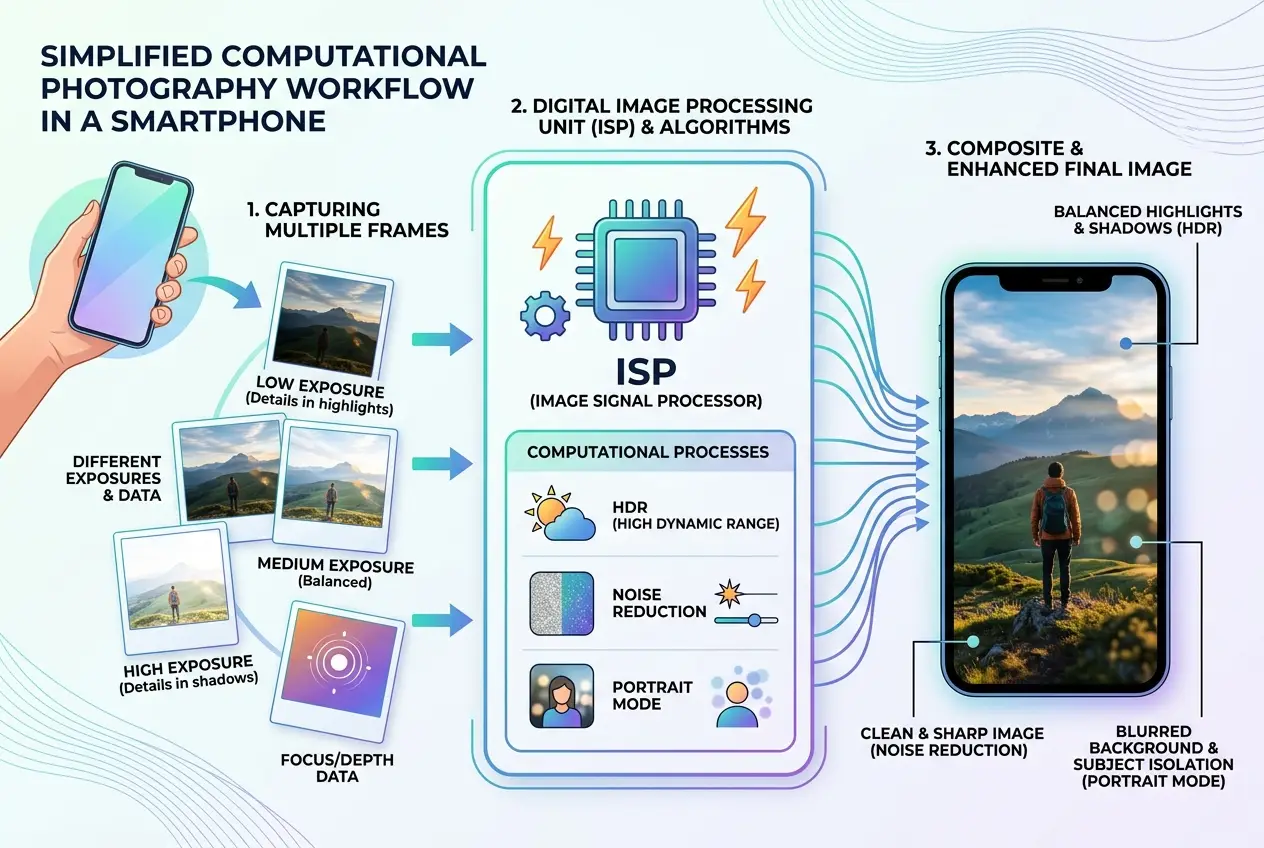
Modern smartphone photography is no longer just about hardware; it's a testament to **computational photography**. This is where software takes center stage, using algorithms to go beyond what a single lens and sensor can capture. Features like **HDR (High Dynamic Range)**, **Portrait Mode**, and **Night Mode** are prime examples.
* **HDR:** Instead of taking one photo, the camera rapidly captures several photos at different exposure levels – some brighter, some darker. The ISP then intelligently merges these into a single image that retains detail in both the brightest highlights and the darkest shadows.
* **Portrait Mode:** This beloved feature uses multiple lenses (on phones that have them) or advanced AI algorithms to create a depth map of the scene. It then blurs the background artificially, mimicking the "bokeh" effect of professional cameras with wide apertures. This level of AI-driven image manipulation reminds me of how AI is being used to decipher complex patterns, much like we discussed in [Can AI Decode Animal Language? New Rosetta Stone](/blogs/can-ai-decode-animal-language-new-rosetta-stone-5105).
* **Night Mode:** This is perhaps the most impressive feat of computational photography. The phone takes dozens of short exposures over several seconds, aligning them to compensate for hand shake, and then stacks them. The ISP then uses sophisticated noise reduction and intelligent brightening algorithms to pull incredible detail out of near-darkness. This is why a simple point-and-shoot camera often can't compete with a modern smartphone in low light, despite potentially having a larger sensor – it lacks the computational muscle.
### From Pixels to Perfection: The Final Output
After all these complex calculations, the ISP compresses the processed image into a standard format like JPEG and saves it to your phone’s memory. What started as light waves bouncing off a scene has been meticulously transformed into a digital file, ready for sharing, editing, or simply admiring.
The quality of your smartphone photos depends on a delicate dance between high-quality optics, a capable image sensor, and, critically, the intelligence of the ISP and the sophistication of its computational photography algorithms. This intricate interplay of components ensures that what your camera "sees" is not just raw light, but a carefully constructed, visually appealing representation of reality. It’s a powerful example of how technology is constantly pushing the boundaries of what’s possible, allowing us to capture moments with unprecedented ease and quality.
### The Future of Phone Cameras
The journey doesn't stop here. Innovations continue at a rapid pace. We're seeing advancements in larger sensors for better light gathering, variable aperture lenses, and even more advanced AI for object recognition, scene understanding, and real-time video processing. The line between what a phone can do and what a professional camera can achieve continues to blur, promising an even more exciting future for digital vision.
Frequently Asked Questions
Multiple lenses on a smartphone camera serve different purposes, such as providing varying focal lengths (wide, ultrawide, telephoto for optical zoom), or gathering depth information for features like Portrait Mode. Each lens is optimized for a specific type of shot.
A megapixel (MP) refers to one million pixels on an image sensor, indicating the resolution of the image a camera can capture. While more megapixels generally mean more detail, image quality is also heavily influenced by sensor size (larger sensors capture more light), lens quality, and the image signal processor (ISP) which processes the raw data.
Night Mode combines multiple short exposures into a single image. The phone takes several photos over a few seconds, aligns them to correct for handshake, and then merges them. Advanced algorithms then reduce noise, brighten shadows, and enhance details to produce a well-exposed and clear image, even in near darkness.
Low-light performance depends on several factors: a larger image sensor (which can collect more light), a wider aperture lens (allowing more light to reach the sensor), and superior Image Signal Processing (ISP) with advanced noise reduction and computational photography algorithms. Phones with better combinations of these elements excel in low light.
While computational photography can significantly enhance images and overcome some hardware limitations (especially in challenging conditions like low light or high dynamic range scenes), it cannot entirely compensate for fundamentally poor hardware. A good image always starts with sufficient light captured by a decent lens and sensor; computational photography then refines and optimizes that initial data.
Verified Expert
Alex Rivers
A professional researcher since age twelve, I delve into mysteries and ignite curiosity by presenting an array of compelling possibilities. I will heighten your curiosity, but by the end, you will possess profound knowledge.
Leave a Reply
Comments (0)
No approved comments yet. Be the first to share your thoughts!
 Join Us



 Unknown Author




































Leave a Reply
Comments (0)